

The Model Context Protocol won quickly. In about two years we watched MCP go from a proposal to the thing every agent speaks: editors, IDEs, desktop apps, CI jobs. When we have a tool and want an agent to use it, we already know what to do. Stand up an MCP server, describe the tools, and that is the job. The client needs no bespoke integration and the model needs no schema explained to it in a prompt. That is what a standard is for, and it worked.
Then there is the web, where we went the other way entirely.
The way an agent uses a website today is by looking at it. Computer use, browser automation, whatever the product calls it, the loop is the same. Take a screenshot, find the button, work out its coordinates, click, screenshot again, check whether it worked. It works, impressively, and it is still a workaround that costs more than it should. A model reasoning about where a dropdown sits in a 1280×800 image is doing arithmetic the page could simply have handed over.
And it has to look at everything. The cookie banner. The newsletter modal. The sticky header, the promo strip, the chat bubble in the corner. None of that means anything to an agent, and all of it is in the way. We pay for it in tokens, in latency, and in the particular failure where a model confidently clicks the wrong thing because something moved four pixels.
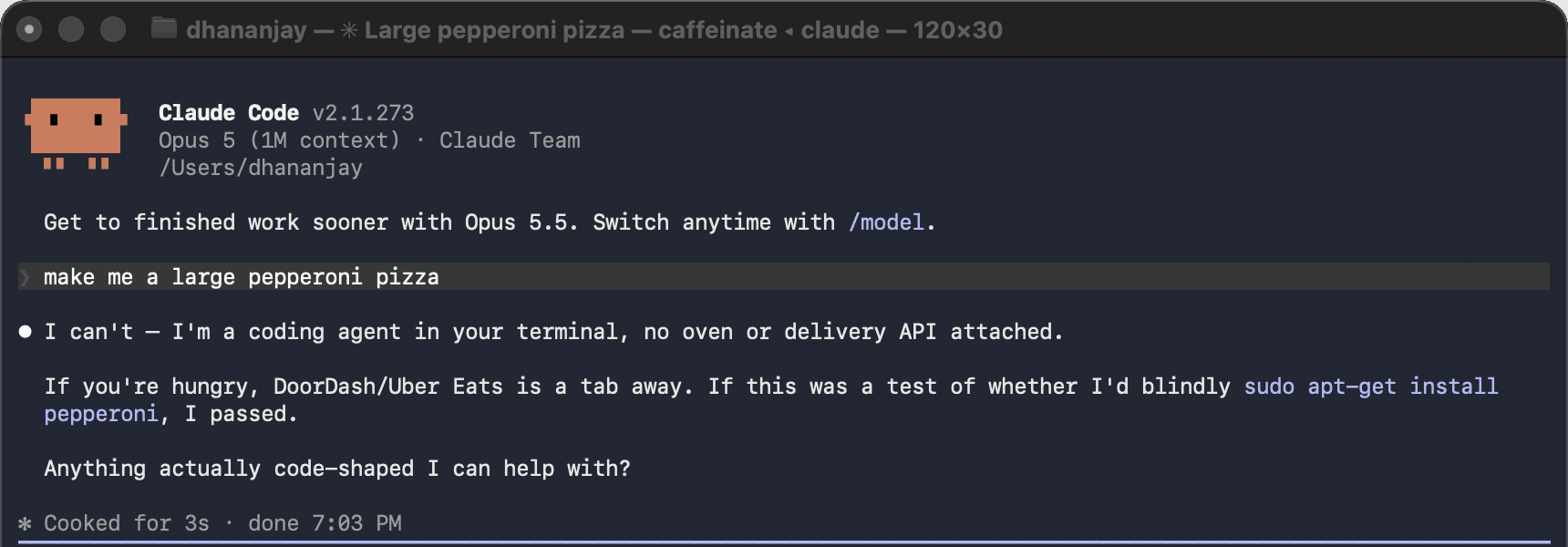
Here is the part we forgot while making agents better at looking. The website already knows the answer. It knows what "add to cart" means, what arguments checkout takes, which actions are destructive. All of it already exists, written down, in the code that renders the page. We never gave sites a way to say it out loud, so we built increasingly clever machinery for guessing it from the outside.
WebMCP is the fix, and in hindsight it is the obvious one. It is a draft spec being incubated at the W3C that lets a page register its capabilities as tools on document.modelContext, with names, JSON schemas, descriptions, and annotations marking which ones carry consequences. No vision. No clicking. No guessing. It is the same shape of contract MCP already gave every other kind of tool, finally extended to the web.
It is a good idea, and it has one problem.
WebMCP tools live inside a browser tab, reachable only by an agent that is also inside that tab. Chrome's demos work beautifully in Chrome. But the agents most of us reach for are processes in a terminal, and to them a page that has already written down every one of its tools is just HTML.
So we have a standard for tools, and a standard for pages that have tools, and no way for one to reach the other.
That gap is what this post is about, and what I spent a few weeks closing.
What a WebMCP page actually publishes
Before going further, here is what a WebMCP page looks like from the inside. The whole API is close to one call:
document.modelContext.registerTool({
  name: "add-to-cart",
  description: "Add an item to the shopping cart",
  inputSchema: {
    type: "object",
    properties: { sku: { type: "string" } },
    required: ["sku"],
  },
  annotations: { consequentialHint: true },
  async execute({ sku }) {
    cart.add(sku);      // a live object in the page
    render();           // that then updates the DOM
    return { content: [{ type: "text", text: "Added " + sku }] };
  },
});
A name, a schema, a description, and an annotation saying this one has consequences. It is exactly the contract MCP already uses everywhere else, which is the point. Nothing here is new to an agent. It is only unreachable.
So I set out to write something that picks up those tools and serves them over MCP.
The tools are real, and they belong to whoever ships the browser
None of this is hypothetical. Chrome has an implementation, and the demo page work exactly the way you would hope. The site says what it can do, the agent does it, and nobody screenshots anything.
But look at what is required in order to be on the receiving end of that. The agent has to be inside the browser. The tools are published to a page, and reaching them means having that page open, in a runtime that implements the spec, inside a product that bundles one.
That quietly turns a web standard into a platform feature. The site publishes its tools to anyone, and in practice "anyone" means whoever has shipped a browser to run them in.
Take a concrete case. Say an agent wants to add something to an order. The page has add-to-cart, with a schema, sitting right there. To call it, the chain runs like this. Launch a browser. Give it a profile. Load the page. Wait for the scripts. Keep the tab alive for the whole call, then tear it down. That is a whole rendering engine, spun up and thrown away, to invoke one function the page had already described in JSON.
And that is the good case, because at least a browser can be launched. Now consider the platforms where it cannot. ChatGPT reaches the outside world through connectors, which are external MCP endpoints it calls over HTTP. It does run WebMCP pages, but only ones OpenAI has onboarded into its own sandbox. I cannot hand it a URL and have it read that page's tools, which is the gatekeeping this whole section is about, showing up inside the platform people would reach for to argue against it. And an agent in CI, an agent on a server, or anything running where there is no display and no Chromium has no browser to spin up at all.
For all of them, a page full of carefully described tools is not hard to reach. It is invisible.
Which is the gap worth closing, so here is the shape of the thing that closes it. A connector is an HTTP endpoint and nothing more, so anything that can post JSON can drive one. This is curl against the hosted conduit, naming a page it has never been configured with:
$ curl -s -X POST "https://conduit.dhananjaay.dev/connect?url=<page>"        -H "Accept: application/json, text/event-stream" -d @initialize.json

{ "protocolVersion": "2025-06-18",
  "capabilities": { "tools": {} },
  "serverInfo": { "name": "webmcp-conduit", "version": "0.4.2" } }

$ ... then tools/list on the same session

7 tools, ttlMs=60000, cacheScope="private"
No browser was involved in that, on either end. Whatever can reach an HTTP endpoint can now reach the page's own tools, which includes the platforms that were never going to render it.
conduit, a WebMCP page served as an MCP server
So the gap is narrow and specific. WebMCP tools are MCP tools in every way that matters: name, schema, description, annotations. The only thing separating them from every MCP client on earth is that they are declared inside a page instead of served from an endpoint.
That is a transform, not a research problem. conduit is the one I wrote. Point it at any WebMCP page and it hands back a standard MCP server.
There is no browser anywhere in that sentence. It is one static binary, a few megabytes of Rust. For anyone who would rather not install anything, there is a hosted URL. What comes out the other side is ordinary MCP. Which means the platforms that cannot launch a browser are exactly the ones it serves best. Give ChatGPT a connector pointing at conduit and it uses a site's own tools without ever rendering the site. The same goes for Claude Code, for Cursor, and for a job running at 3am on a machine with no display.
One detail decides how it works. The tools only exist once the page's code has run, so conduit runs it. It does that in a small embedded JavaScript engine with a DOM attached, which is enough to execute the page's own scripts and collect what they register. There is no headless browser involved.
Running conduit against a page
One command reports what a page offers:
$ conduit probe https://googlechromelabs.github.io/webmcp-tools/demos/pizza-maker/
https://googlechromelabs.github.io/webmcp-tools/demos/pizza-maker/
  engine: isolate   scripts: 2/2 ran   tools: 7

  googlechromelabs_github_io__set_pizza_size
      Set the pizza size directly or infer it based on the number of people.
  googlechromelabs_github_io__set_pizza_style
      Set the style of the pizza (colors/theme)
  googlechromelabs_github_io__toggle_layer
      Control pizza layers (sauce, cheese). Use "add", "remove", or "toggle".
  googlechromelabs_github_io__add_topping
      Add one or more toppings to the pizza
  googlechromelabs_github_io__remove_topping
      Remove a specific topping from the pizza
  googlechromelabs_github_io__manage_pizza
      Manage pizza state
  googlechromelabs_github_io__share_pizza
      Get a shareable URL for the current pizza creation
That demo does not annotate its tools, so here is a local page that does, which is the part I care about most:
$ conduit probe todo.html
todo.html
  engine: isolate   scripts: 1/1 ran   tools: 4

  local__add-todo
      Add a new item to the user's active todo list
  local__list-todos [read-only]
      List every todo item currently on the page
  local__clear-all [consequential]
      Delete every todo permanently
  local__subscribe
      Subscribe to the newsletter
The annotations survive the trip. [read-only] and [consequential] are the page's own readOnlyHint and consequentialHint, and conduit maps the second onto MCP's destructiveHint and writes it into the description as well, so a client that ignores annotations still shows the model that this one deletes things. The site's own judgement about which actions are dangerous arrives intact.
Then point a client at it. The client never learns WebMCP was involved. There is nothing to add to the page and no token to paste. It sees an MCP server like any other:
{
  "mcpServers": {
    "pizza": {
      "command": "conduit",
      "args": ["serve", "https://googlechromelabs.github.io/webmcp-tools/demos/pizza-maker/"]
    }
  }
}
For a platform that only takes external connectors, the same thing over HTTP is a URL and nothing else:
{
  "mcpServers": {
    "pizza": {
      "type": "http",
      "url": "https://conduit.dhananjaay.dev/connect?url=https://googlechromelabs.github.io/webmcp-tools/demos/pizza-maker/"
    }
  }
}
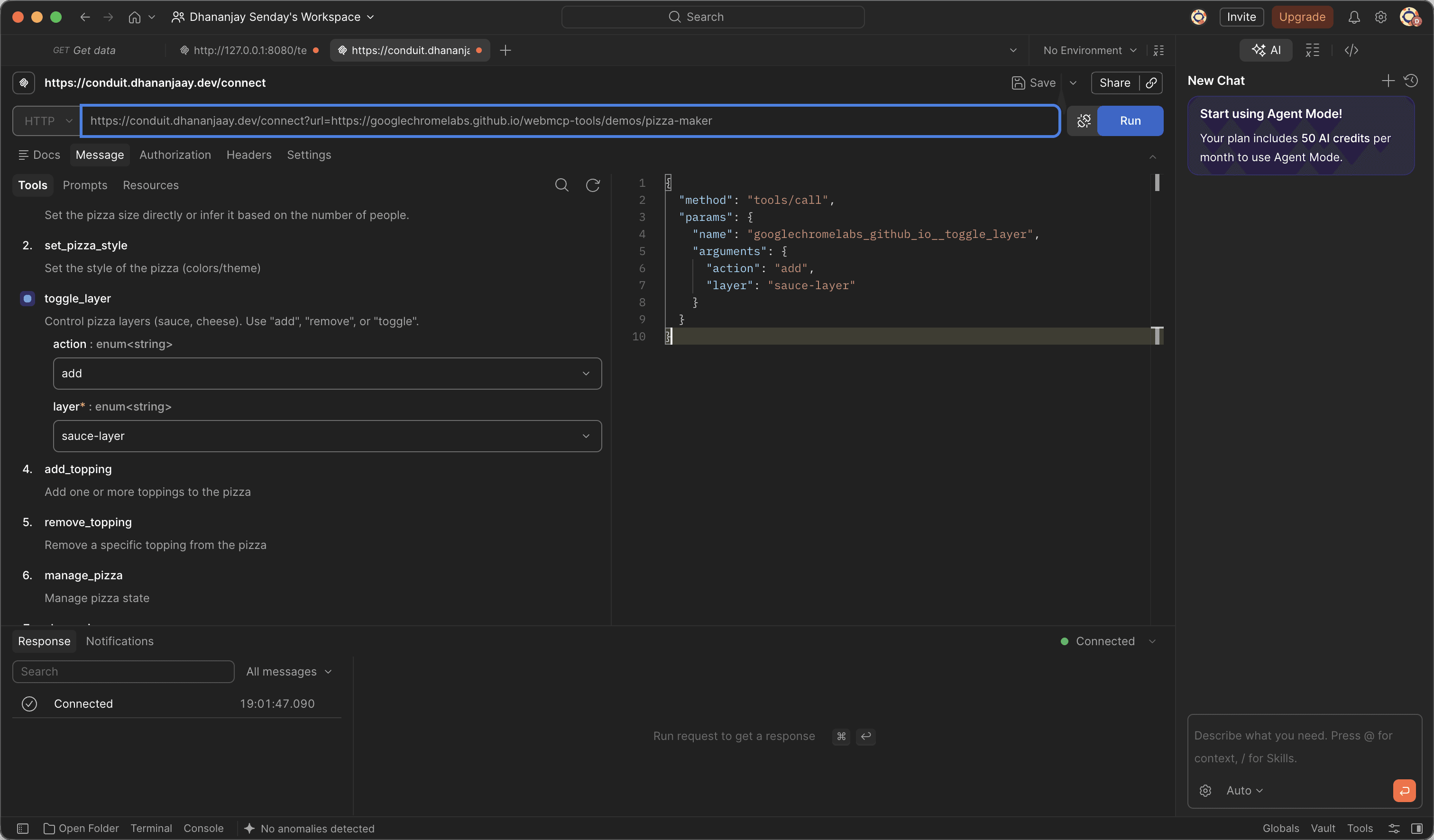
And because what comes out is ordinary MCP, this is not a Claude trick. Here is Postman, which has never heard of WebMCP, listing a page's tools and calling one:
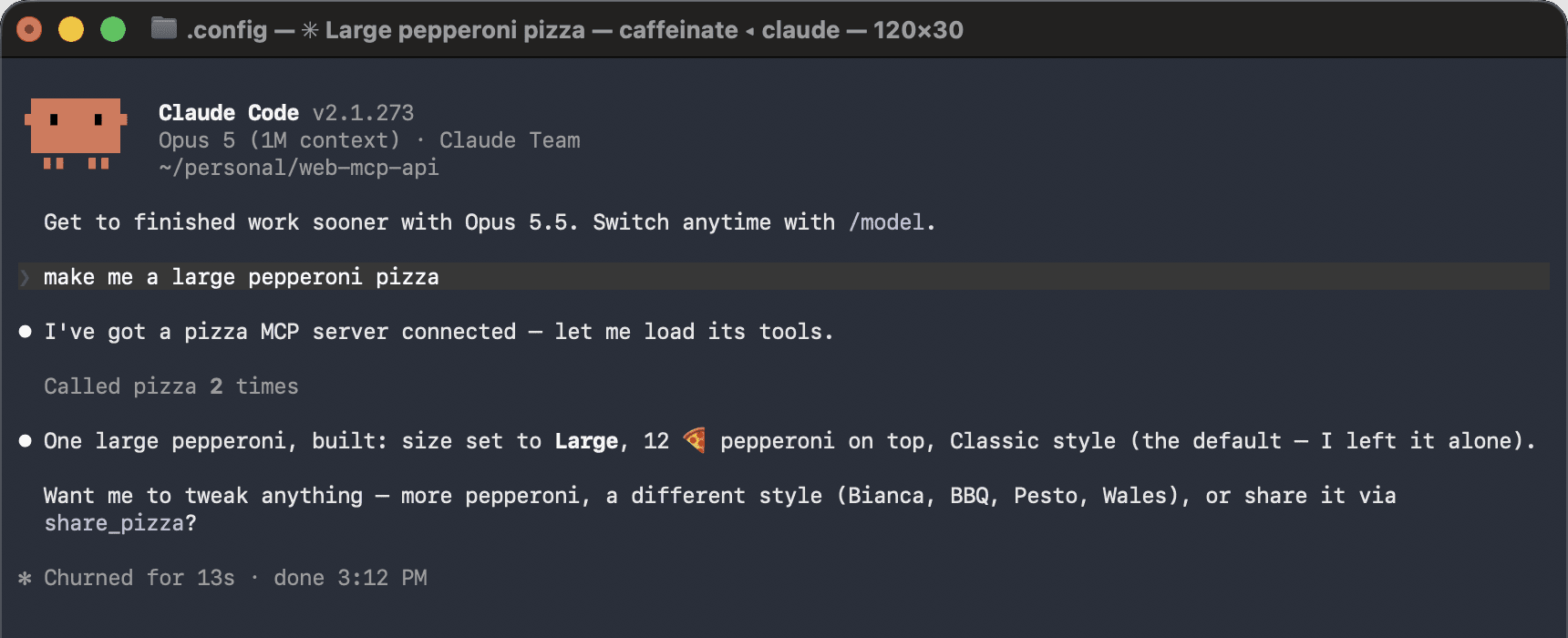
And here is the request from the top of this post, asked again with conduit connected:
Two things it will not do, since a post that only lists what a tool can do is selling rather than explaining. A site can switch WebMCP off with Permissions-Policy: tools=(), which a browser enforces before any script runs, and conduit checks that header and refuses rather than overriding an explicit no. And everything a page says about its own tools, the names, the descriptions, the results, is a string written by that page and handed to a model. Point this at sites the way you would open them: knowing whose code you are running.
Build an endpoint for any WebMCP page
Easier to hand over than to describe. Give the builder below the URL of any page that registers WebMCP tools and it returns an endpoint ready to use in Claude Code, in Postman, or in anything else that speaks MCP.
https://conduit.dhananjaay.dev/connect?url=https%3A%2F%2Fgooglechromelabs.github.io%2Fwebmcp-tools%2Fdemos%2Fpizza-maker%2F
claude mcp add --transport http googlechromelabs "https://conduit.dhananjaay.dev/connect?url=https%3A%2F%2Fgooglechromelabs.github.io%2Fwebmcp-tools%2Fdemos%2Fpizza-maker%2F"
{
  "mcpServers": {
    "googlechromelabs": {
      "type": "http",
      "url": "https://conduit.dhananjaay.dev/connect?url=https%3A%2F%2Fgooglechromelabs.github.io%2Fwebmcp-tools%2Fdemos%2Fpizza-maker%2F"
    }
  }
}
For Postman, open a new MCP request and paste the endpoint straight into the URL bar.
It produces the hosted endpoint, a ready-to-run claude mcp add command, and the JSON block for a config file. The page makes no requests of its own. It composes a URL to take elsewhere.
The work happens when a client connects. The page boots inside conduit at that moment, which is why the first call to a page conduit has not seen before takes a few seconds. The second call is immediate, because the page is still alive and waiting.
Install conduit, or skip the install
The installer works out your platform, takes the latest release, and checks the download against the published checksums. If piping a script into a shell is not something you do, the releases page has the archives and the sums, and the script is short enough to read first.
curl -fsSL https://raw.githubusercontent.com/Dhananjay-JSR/webmcp-conduit/main/install.sh | sh

conduit probe https://googlechromelabs.github.io/webmcp-tools/demos/pizza-maker/
Or skip the install entirely and point a client at the hosted instance, using the builder above to name the page you want.
The code is on GitHub.
None of this asks anything of the sites themselves, which is the part I keep coming back to. A site implements WebMCP once, for browser agents, and every other agent can reach it too. The work is already done. It was only ever the distribution that was missing.